MIDI Files Explained: General MIDI, USB Sticks, Organs and Editing
MIDI is one of the easiest and most useful formats in music. A whole song can fit in a few kilobytes, it plays on almost any keyboard or organ, and you can change anything in it: notes, tempo, key and instruments.
What is a MIDI file?
MIDI stands for Musical Instrument Digital Interface. A MIDI file (.mid or .midi) does not contain recorded sound. It contains instructions, like sheet music for a machine: which note to play, when it starts, how long it lasts, and how hard it was pressed. The device that plays the file decides what it sounds like.
That is why a MIDI file is tiny, and why the same file can sound like a piano on one keyboard and a full band on another. It was introduced in the early 1980s so that instruments from different makers could talk to each other, and it is still used everywhere today, from home keyboards to professional studios.
MIDI vs MP3 and WAV
People often mix these up. The difference is simple: audio files store the sound itself, MIDI stores the performance.
| Feature | MIDI (.mid) | MP3 / WAV |
|---|---|---|
| What it stores | Notes, timing, instruments, controllers | The recorded sound wave |
| Typical size | 5 to 100 KB for a song | 3 to 50 MB for a song |
| Sound | Depends on the device or software that plays it | Always the same |
| Editing | Change any note, key, tempo or instrument | Very limited, quality drops |
| Best for | Backing tracks, learning, arranging, live keyboards | Listening and sharing finished recordings |
What is inside a MIDI file?
- Notes with start time, length and velocity (how strong the key press was).
- Tempo and time signature.
- Program changes, which choose the instrument (piano, strings, oud-like sounds and so on).
- Controllers, such as volume (CC7), pan (CC10) and sustain pedal (CC64).
- Pitch bend, used for slides, vibrato and sometimes to imitate quarter tones.
- 16 channels. Each channel can carry one instrument, and channel 10 is used for drums.
MIDI Format 0, 1 and 2
Every MIDI file is saved in one of three formats. You will mostly meet the first two.
| Format | How it is built | When to use it |
|---|---|---|
| Format 0 | All channels merged into a single track | Most compatible. Many keyboards, organs and old players prefer it. |
| Format 1 | Several tracks played together, usually one per instrument | Best for editing and for DAWs, since each part stays separate. |
| Format 2 | Several independent songs or patterns in one file | Rare. Most software does not support it. |
A good habit is to edit in Format 1, then save a Format 0 copy for your keyboard or organ.
What is General MIDI (GM)?
General MIDI is a standard that says every compatible device must offer the same 128 instruments in the same order. Program 1 is Acoustic Grand Piano on every GM device, and channel 10 is always the drum kit with a standard layout. Because of this, a file made on one device sounds close to what the author intended on another.
| Item | General MIDI rule |
|---|---|
| Instruments | 128 sounds in a fixed order |
| Drums | Channel 10, standard drum map |
| Channels | 16, with at least 24 voices of polyphony |
The 16 GM instrument families
The 128 sounds are grouped in 16 families of 8. Knowing the groups helps you find the right program number quickly. Numbers here are the usual 1 to 128 list; some software counts from 0 to 127, so subtract one there.
| Programs | Family | Programs | Family |
|---|---|---|---|
| 1–8 | Piano | 65–72 | Reed (sax, oboe, clarinet) |
| 9–16 | Chromatic percussion | 73–80 | Pipe (flute, recorder) |
| 17–24 | Organ | 81–88 | Synth lead |
| 25–32 | Guitar | 89–96 | Synth pad |
| 33–40 | Bass | 97–104 | Synth effects |
| 41–48 | Strings | 105–112 | Ethnic (sitar, shamisen, kalimba) |
| 49–56 | Ensemble (choir, strings section) | 113–120 | Percussive |
| 57–64 | Brass | 121–128 | Sound effects |
The GM drum map
On channel 10, each note number is a different drum, not a pitch. These are the ones you will use most, with middle C as note 60:
| Note | Drum | Note | Drum |
|---|---|---|---|
| 36 | Bass drum (kick) | 46 | Open hi-hat |
| 38 | Snare | 49 | Crash cymbal |
| 42 | Closed hi-hat | 51 | Ride cymbal |
If your drums sound like random pitched notes, they are almost certainly on the wrong channel.
How to make a MIDI file play GM sounds
If a file sounds wrong, such as a guitar part played by a piano or drums played as notes, check these points in order:
- Reset the device to GM mode at the start. A GM System On message does this, and many editors can insert it.
- Set a program change at the beginning of every track so each channel picks the right instrument.
- Put drums on channel 10. If drums are on another channel, they will play as a melodic instrument.
- Check the volume and pan of each channel, so nothing is silent or too loud.
- Check the tempo at the start of the file.
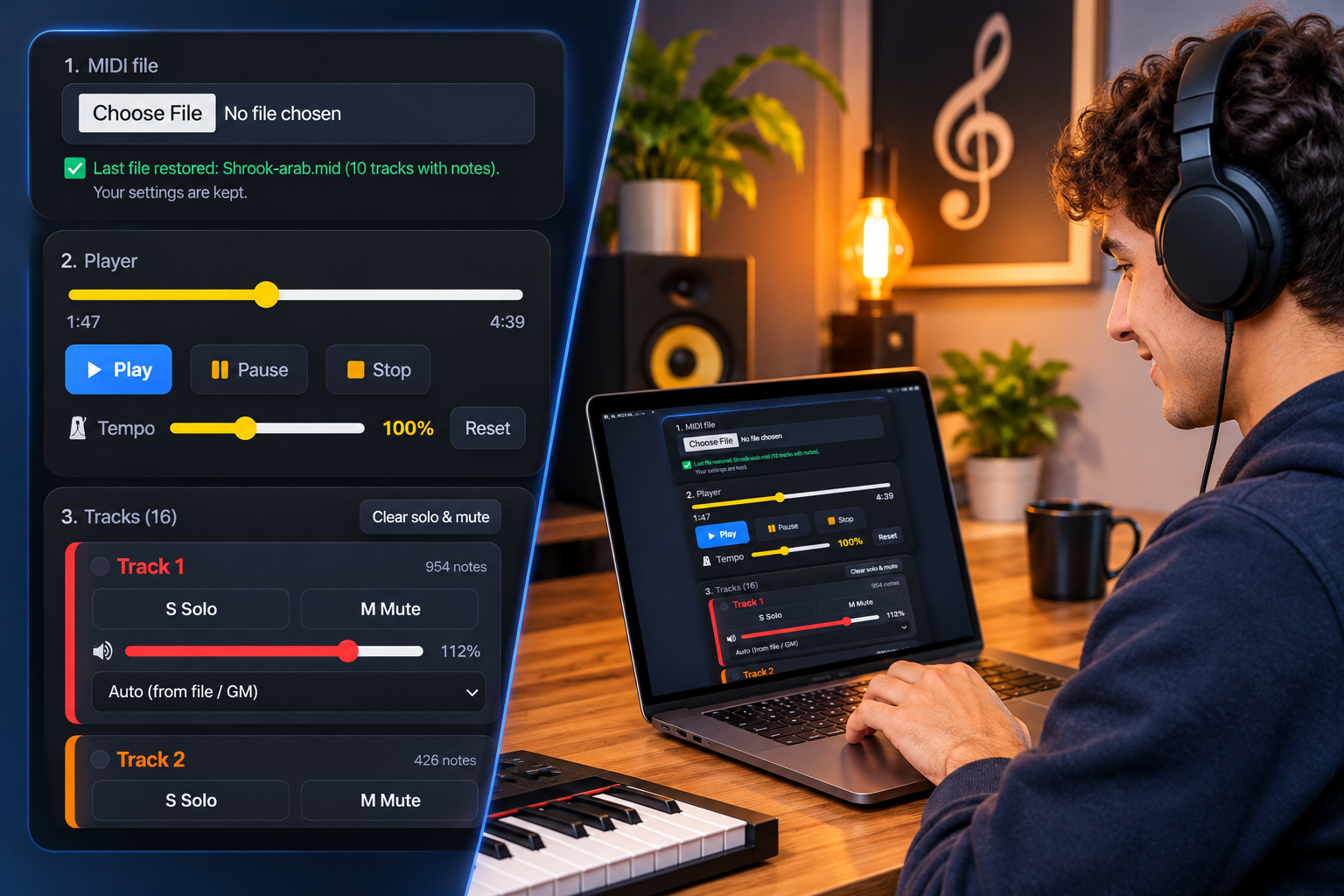
With the Musician Tools MIDI tool you can open a file, listen, mute or solo each track, change a track instrument and adjust tempo and volume, then confirm the result before you save it for your keyboard.
Want to test a file right now?
🎹 Open the free MIDI ToolUsing MIDI on a USB stick with your keyboard or organ
Many keyboards, arrangers and organs can play MIDI files directly from a USB stick. This makes MIDI easy to use on stage or at home.
- Format the stick as FAT32, which is the format most instruments understand.
- Use a small stick and keep file names short and simple, without unusual symbols.
- Put the files in the main folder, or in the folder your manual names.
- Some instruments prefer Format 0 (all tracks merged into one). If a file does not load, try saving it as Format 0.
- Always check your instrument manual, since each brand has its own rules.
A quick routine that works for most people: edit your file, save it as Format 0 with a short English name, copy it to the root of a FAT32 stick, eject the stick safely, then plug it into the instrument and browse to the file.
Troubleshooting table
| Problem | Likely cause | Fix |
|---|---|---|
| The instrument does not see the file | Stick not FAT32, wrong folder, or long name | Reformat as FAT32, move the file to the main folder, shorten the name |
| The file is seen but will not load | Format 1 or 2 not supported | Save as Format 0 |
| Drums play as pitched notes | Drums are not on channel 10 | Move the drum track to channel 10 |
| Wrong instruments | Missing or wrong program changes | Add a program change at the start of each track |
| Some parts are silent | Channel volume is 0, or the track is muted | Check CC7 volume and the mute state |
| Song starts too fast or too slow | Tempo event is wrong or missing | Set the tempo at the first beat |
| Notes keep ringing | Sustain pedal (CC64) was never released | Add a sustain off message at the end |
Fixing and editing MIDI
Because MIDI is just data, almost everything can be changed without losing quality:
- Transpose the song to a key that suits your voice.
- Change the tempo to practise slowly or perform faster.
- Swap instruments by changing the program of a track.
- Mute or solo a track to learn one part, or to remove the melody and sing over it.
- Fix wrong notes in a piano roll, or clean up timing with quantize.
Free editors such as MuseScore, MidiEditor and Cakewalk can do these jobs, and a DAW like Reaper offers full control.
Common uses for MIDI
- Backing tracks and rhythm accompaniment for singers and players.
- Karaoke and rehearsal files.
- Learning songs slowly, one part at a time.
- Composing, arranging and printing sheet music.
- Live performance on arranger keyboards and organs.
Quick glossary
- Velocity: how hard a key is pressed, from 1 to 127.
- Channel: one of 16 lanes in a MIDI file, each with its own instrument.
- Program change: a message that selects the instrument for a channel.
- CC (control change): a message for volume, pan, sustain and other settings.
- Quantize: snapping notes to an exact rhythmic grid.
- Polyphony: how many notes a device can play at the same time.
- Sound bank: the set of instrument sounds inside a device or software.
Frequently asked questions
Is MIDI the same as MP3?
No. MP3 is recorded sound. MIDI is a list of instructions, so it is much smaller and fully editable.
Why does the same MIDI sound different on two devices?
Each device has its own sound bank. The notes are the same, but the instrument sounds are different.
Why does my keyboard or organ not show my MIDI file?
Usually the stick is not FAT32, the name is too long or has unusual symbols, the file is in the wrong folder, or the instrument needs Format 0. Fix those four points first.
Can MIDI play Arabic quarter tones?
Standard MIDI notes are semitones. Files often use pitch bend to imitate quarter tones, and some instruments have special microtonal scales. Check what your instrument supports.
What is the difference between .mid and .kar files?
A .kar file is a MIDI file that also carries lyrics for karaoke. Most players open it like a normal MIDI file, and many just need the extension renamed to .mid.
Is a MIDI file free to use?
Not always. A MIDI arrangement of a copyrighted song is still protected, even though it has no recorded sound. Use files you made yourself, or files whose licence allows your use.
If you would like to try MIDI, here is the tool.
🎹 Open the MIDI ToolAbout this guide
This guide explains MIDI files for beginners and working musicians. It covers what MIDI is, General MIDI instruments, how to load MIDI files on a USB stick for keyboards and organs, and how to fix and edit them. You can also read this guide in Arabic, and try the free Musician Tools MIDI player and track editor in your browser.